


Annual performance reviews can be stressful for managers and HR teams. You have to collect feedback, check goal progress, stay organized, and make sure every employee gets a fair review. Doing all of this manually takes a lot of time and can lead to mistakes. This is the reason why many companies use annual performance review software.
These tools make performance reviews easier to manage by helping you track goals, organize feedback, and see clear data about how your employees are doing. The best HR performance management software in 2026 also includes features like automation, customizable review templates, analytics dashboards, and 360-degree feedback options.
In this article, we list the top 5 annual performance review tools for employers in 2026. You’ll learn what each platform offers, their pros and cons, and what they cost so you can choose the software that fits your team’s needs.
Before you start, download our free 9-Box Grid template to help you quickly spot high-potential employees.
Why Invest in Annual Performance Review Software?
Many companies still use spreadsheets, email threads, or paper forms to manage annual performance reviews. While this might work for very small teams, it often becomes confusing and time-consuming as a company grows. Annual performance review software helps solve these problems by giving managers and HR teams a clear and organized system for tracking employee performance.
Investing in this type of software can save hours of manual work. It keeps all review information in one place, which makes it easier to prepare evaluations and spot important trends across your workforce. With a dedicated tool, you no longer have to chase people for feedback or worry that important information was lost in someone’s inbox.
Another benefit is accuracy. A performance management system uses structured questions and consistent scoring, so employees are evaluated more fairly. It also helps managers access reliable data that supports better decisions about promotions, training, or future goals.
Finally, annual performance review software encourages growth. When employees receive clear feedback and understand what they need to improve, they are more likely to stay motivated and engaged. This supports a healthier work culture and stronger long-term performance.
Benefits of Annual Performance Review Software
Annual performance review software offers many advantages for managers and HR teams. It simplifies the entire performance management cycle and helps you focus on what really matters, which is supporting your employees and improving overall performance.
One of the biggest benefits is better organization in general. With all reviews, notes, and ratings in one place, you can easily keep track of deadlines and make sure every employee receives feedback on time. This is especially important for growing companies where managing reviews manually becomes overwhelming and tracking the results across the years is important.
Here are some more benefits of using annual performance review software:
- More accurate data: Using structured forms and consistent employee performance review questions helps create fairer comparisons across teams.
- Stronger insights: Easy-to-read reports and analytics help you identify performance trends, skill gaps, and areas where employees need more support.
- Clearer communication: Managers can use performance review phrases and guided feedback tools to share helpful and specific comments.
- Stronger employee engagement: When employees receive clear and regular feedback, they understand how to grow and feel more supported in their role.
- Less manual work: Automated reminders, templates, and built-in workflows save hours of administrative time.
Overall, annual performance review software makes the process smoother, more transparent, and easier for everyone involved. It gives managers the information they need to make better decisions and helps employees understand how they can grow in their careers.
Key Features of an Annual Performance Review Software
When choosing annual performance review software, you should look for features that make reviews easier, fairer, and more useful. The main features include:
- Customization: Create your own review templates, questions, and scoring to fit your team.
- Goal Setting and Tracking: Set employee goals and track progress throughout the year.
- 360 Reviews: Collect feedback from managers, peers, and employees themselves.
- Reporting and Analytics: See scores, trends, and team performance at a glance.
- Usability: Easy for managers and employees to use without a steep learning curve.
- Competency Management: Evaluate skills and behaviors to spot strengths and growth areas.
- Multiple Question Types: Use ratings, multiple choice, or free-text questions to get clear feedback.
These features help you save time, understand employee performance better, and make fair decisions that support growth.
Best 5 Annual Performance Review Software for Employers in 2026
1. Factorial
Summary: Factorial helps you run clear, organized, and fair performance reviews by giving them all the tools they need in one place. You can set up review cycles, track who has completed their reviews, and use ready-made or custom templates to guide the process. After the cycle ends, Factorial provides detailed insights that help you understand team strengths and areas for improvement.
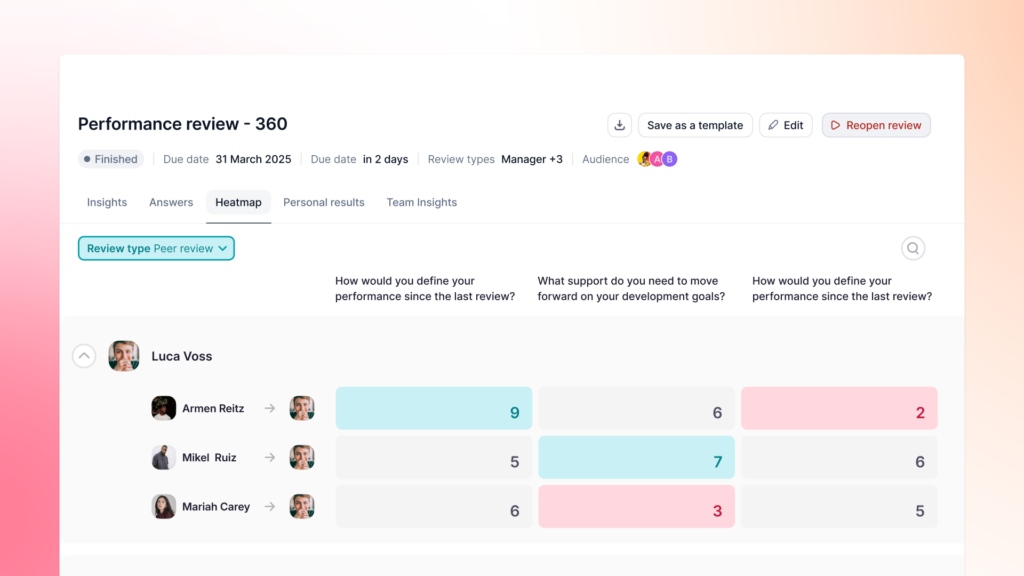
Features like heatmaps, score breakdowns, and team insights help you make better decisions about development, feedback, and training. You can also use competency levels, 9 Box talent mapping, and spider charts to see how employees are growing over time. This makes Factorial a strong solution for managers who want reliable data and a smoother review process. Take a look at Factorial’s performance management module for more info.
Pros
- Very customizable so you can build reviews that match their team’s needs.
- Supports multiple review types like self reviews, peer reviews, manager reviews, and 360 feedback.
- Strong analytics that help you understand performance trends at a glance.
- Competency frameworks make evaluations clearer and more consistent.
- Works well for teams in different departments or locations.
Cons
- Some advanced analytics may still be rolling out in certain accounts.
- You may need time to plan templates and competency groups if they want a highly structured system.
Price: Pricing starts at $8/user/month.
2. PerformYard
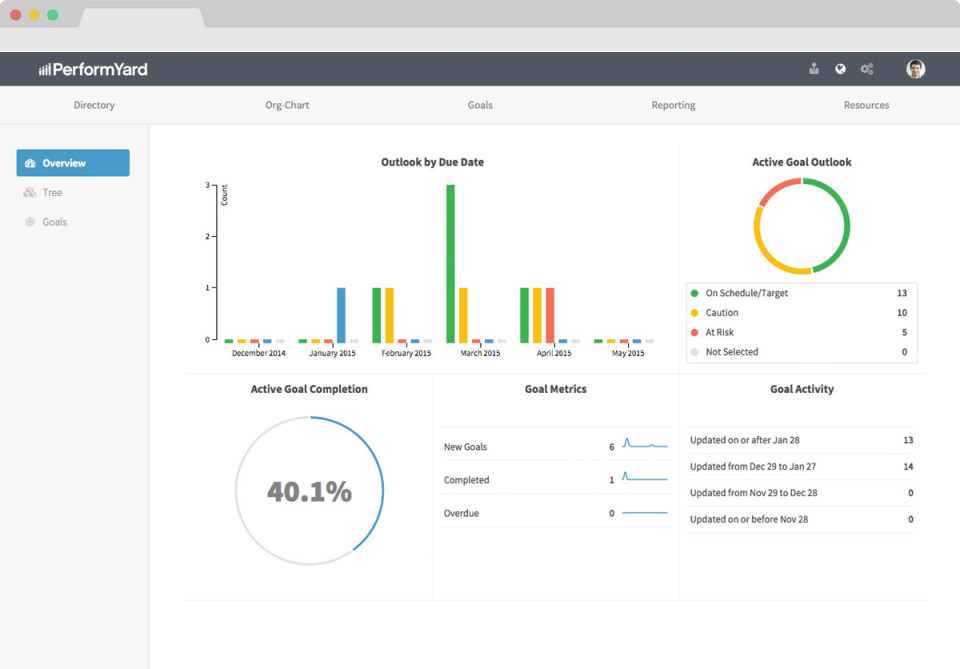
Summary: PerformYard is designed to help you run performance reviews without complicated manual steps. It focuses on giving managers clear workflows, easy-to-use templates, and options for annual, quarterly, and 360-degree reviews. You can track goals and view real-time dashboards that show who is doing well and who may need extra support. The system also organizes feedback so you can spot patterns quickly and prepare for review conversations with less stress. PerformYard works well for teams that need flexibility and want a simple but powerful tool for keeping performance reviews on track.
Pros
- Flexible workflows that help you set up reviews that match team needs.
- Goal tracking helps you see progress throughout the year.
- Real-time dashboards show review status and team performance clearly.
- Helpful for managers who want straightforward tools without extra complexity.
Cons
- Additional features may cost extra.
- Some managers may find the interface simpler than other full HR suites.
- Large or complex teams may need extra setup support.
Price: Between $5-10/user/month.
Pricing based on information available at the time of writing of this article.
3. Zoho People
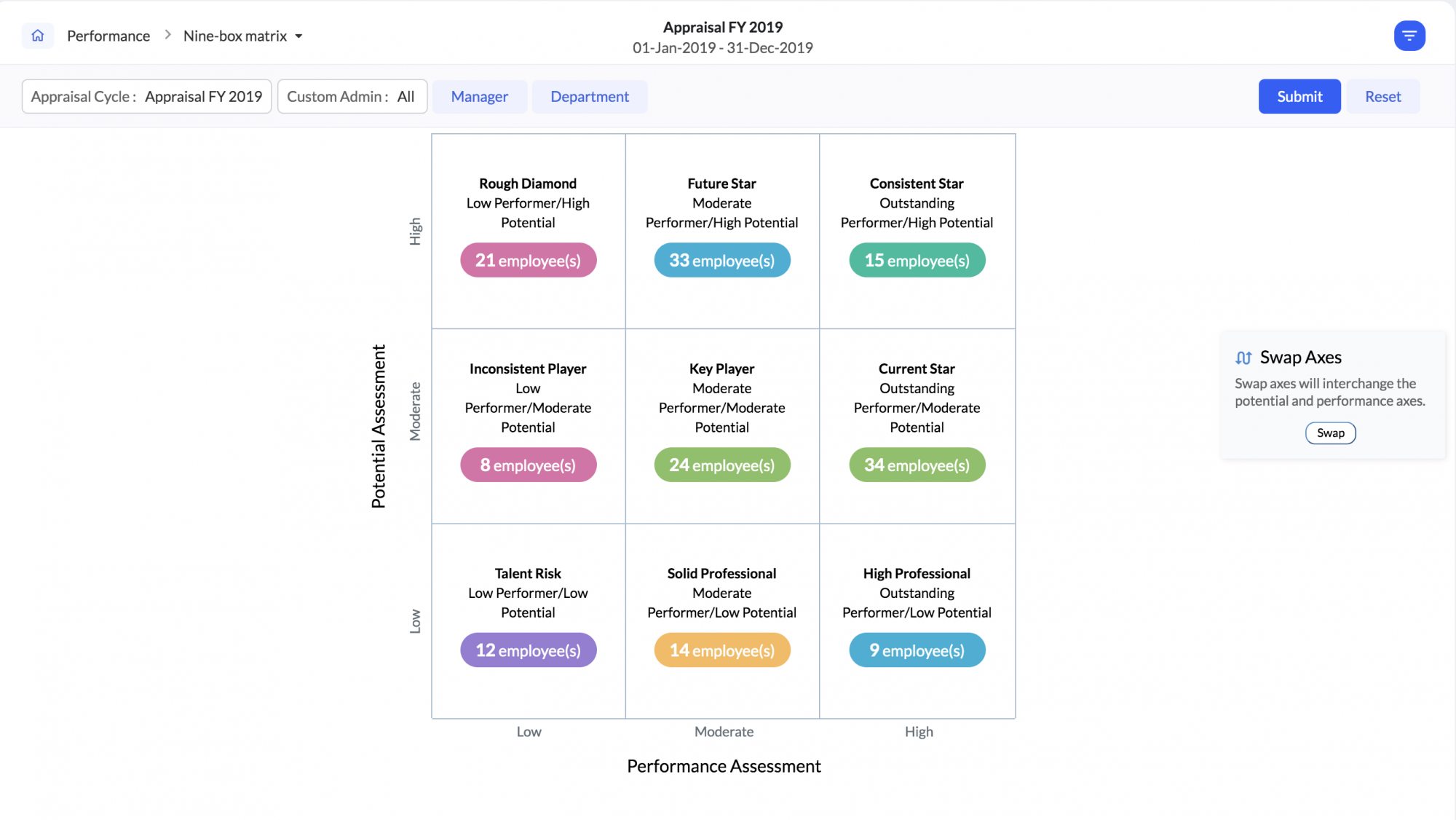
Summary: Zoho People gives managers easy access to performance tools inside a wider HR platform. This makes it helpful for managers who want everything in one system, such as attendance, leave, timesheets, and reviews. The performance module includes goal tracking, review templates, and simple reports. For managers who just need the basics and want an affordable option, Zoho People provides a clean and organized way to handle annual reviews without switching between different platforms.
Pros
- Affordable, which is helpful for small teams.
- Works well if you already use other Zoho tools.
- Gives managers a full HR suite with reviews included.
Cons
- Fewer advanced analytics compared to dedicated performance platforms.
- May feel too basic for teams with more complex performance needs.
Price: Starts at $3/user/month for performance features.
Pricing based on information available at the time of writing of this article.
4. Workday
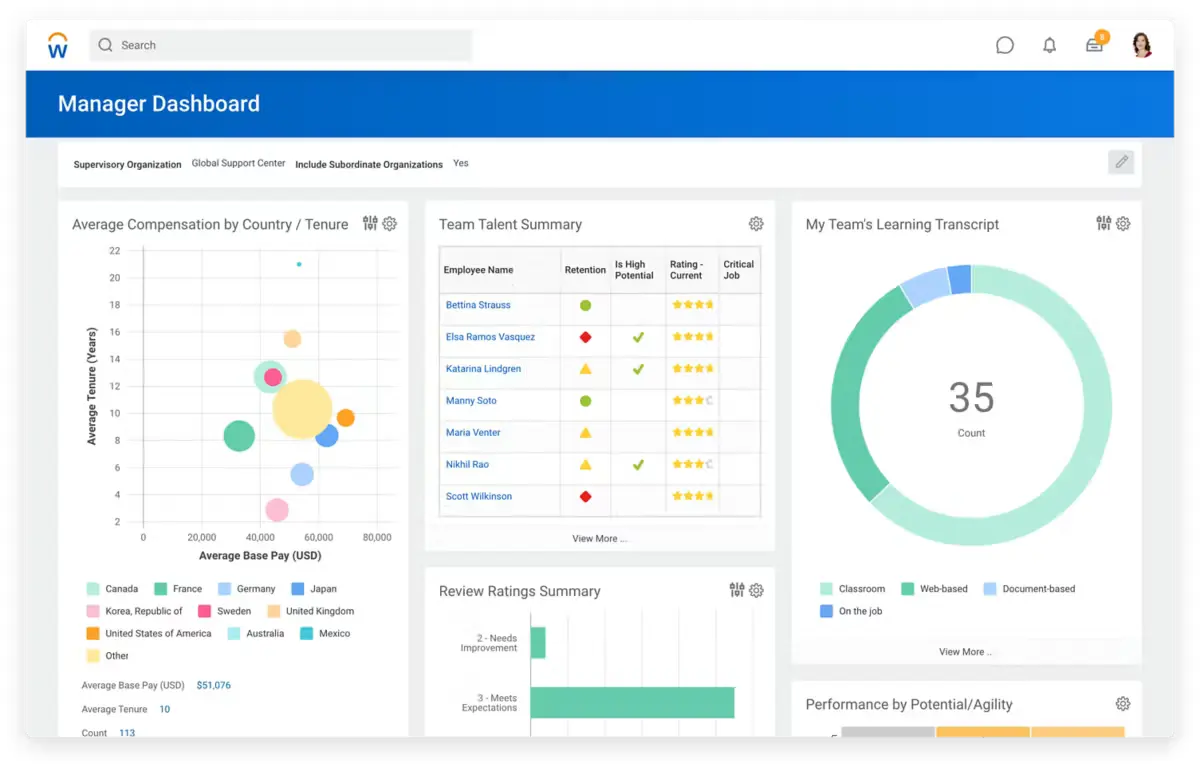
Summary: Workday is built for larger organizations and gives managers a complete view of their teams in one system. It includes performance reviews, talent management, HR data, and training all together. This helps managers at big companies stay organized and make decisions with accurate information. Workday is powerful and supports complex structures, which is useful for managers handling many teams, locations, or seniority levels.
Pros
- Very comprehensive with many HR and performance features in one system.
- Helps managers in large companies track performance across many teams.
- Scales well for organizations that expect to grow.
Cons
- Often more expensive than smaller tools.
- Setup may take longer due to the system’s size.
- Not ideal for managers who want something simple or quick to set up.
Price: No pricing information available online. Request a quote on their website for more information.
Pricing based on information available at the time of writing of this article.
5. Workleap
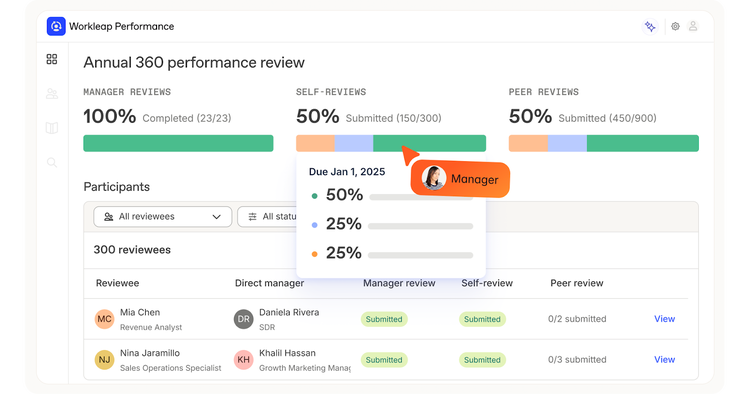
Summary: Workleap provides managers with an easy and friendly way to run performance reviews. It supports 360 feedback, recurring reviews, and customizable templates that help managers stay consistent from one cycle to the next. Dashboards show real-time progress so managers always know who has completed their reviews. It is a simple and effective tool for managers who want clear insights without extra complexity.
Pros
- Easy to use and helpful for small and midsize teams.
- Customizable templates help keep reviews consistent.
- Real-time dashboards make it simple to track employee progress.
Cons
- Fewer integrations than some larger systems.
- May not offer enough depth for very large companies.
Price: Starts at $5/user/month for a minimum of 10 users.
Annual Performance Review Software Comparison Chart
| Platform | Key Features | Best For | Price* |
|---|---|---|---|
| Factorial | Custom templates, 360 reviews, analytics, competencies, goal tracking | Small to mid-size teams and multi-location companies | $8/user/month |
| PerformYard | Structured workflows, dashboards, goal tracking | Teams needing repeatable and structured reviews | $5–$10/user/month |
| Zoho People | HR suite with performance management, customizable templates | Small to medium teams, especially using Zoho apps | Starts at $3/user/month |
| Workday | Comprehensive HR and performance features, detailed reporting, scalability | Medium to large enterprises | Pricing not available online; request a quote |
| Workleap | Simple interface, dashboards, customizable templates | Small to growing teams | Starts at $5/user/month (min 10 users) |
How to Choose the Best Annual Performance Review Software for Your Team
Choosing the right performance review software can make a big difference for managers. Here are some key points to consider:
Team Size
- Small teams may benefit from simpler, easy-to-use tools like Workleap or Zoho People.
- Medium to large teams may need more advanced platforms like Factorial, PerformYard, or Workday.
Customization Needs
- If you want to create your own review templates, add custom questions, or set up specific scoring systems, look for software that allows flexible customization.
Integration with Other HR Tools
- Check if the software can connect with your payroll, time tracking, or HR management system. This saves time and keeps all employee data in one place.
Budget
- Costs vary by company size and features. Small teams can start with lower-priced plans like Zoho People or Workleap, while enterprise tools like Workday may be more expensive.
Analytics and Reporting
- Managers need insights to make informed decisions. Choose software that offers dashboards, trend tracking, and reports on team performance.
By thinking about these points, managers can pick the software that fits their team, helps them save time, and supports the growth of their team.
Streamlining Your Annual Performance Reviews with Factorial
Managing annual performance reviews can be challenging for managers. Factorial makes it easier by giving you the tools to understand your team and plan for growth.
You can quickly create reviews for one team, multiple teams, or different locations. Use ready-made templates or customize your own to focus on the skills and goals that matter most. Factorial supports self reviews, manager reviews, peer reviews, and 360-degree feedback, giving a complete picture of each employee’s performance.
The analytics tools help managers see trends, strengths, and areas where employees need support. With heat maps, 9-box grids, and spider charts, you can identify skill gaps and plan development strategies for your team. Goal tracking and competency management make it easy to set clear expectations and monitor progress over time.
Having all this information in one place saves time and helps managers make smarter decisions. Instead of just reviewing performance, you can understand your team’s needs and create strategies to help them grow and succeed.
Annual performance reviews are essential for promoting accountability, growth, and employee satisfaction. Factorial helps managers understand their team, identify development needs, and plan strategies for success.
Schedule a demo today to see how Factorial can help you unlock your team’s full potential.
Annual Performance Review Software FAQs
1. What is the best HR performance management software?
The best software depends on your team size, needs, and budget. Factorial is ideal for managers who want easy-to-use reviews, goal tracking, and analytics all in one place. Other options include PerformYard, Zoho People, Workday, and Workleap.
2. Does Factorial have a performance management tool?
Yes. Factorial offers performance reviews, goal tracking, competency management, and powerful analytics. Managers can create custom reviews, gather feedback, and track progress over time.
3. How does performance review software improve employee engagement?
By providing clear feedback and recognizing achievements, managers can motivate employees. Reviews also help identify development needs and create growth strategies, making employees feel valued and supported.
4. Can Factorial’s performance review software integrate with my existing HR software?
Yes. Factorial works with payroll, time tracking, and other HR systems, keeping all employee information in one place and reducing manual work.
5. Is Factorial’s performance management software customizable?
Yes. You can create your own review templates, add custom questions, and adjust scoring to fit your team’s goals and evaluation needs.
6. What’s the difference between 360-degree feedback and self-assessment in performance reviews?
- Self-assessment: Employees evaluate themselves.
- 360-degree feedback: Managers, peers, and sometimes direct reports provide feedback, giving a complete view of performance.
7. What are the typical costs of annual performance review software?
Prices vary based on company size and platform. Factorial starts at $8 per user per month and includes features like time tracking and document management, making it a good overall value.
8. What kind of reports can I generate using performance review software?
With performance review software, managers can generate a wide variety of reports that help them understand both individual and team performance. You can track employee scores, see how each person performs across different skills and competencies, and identify high and low performers. Reports can also show trends over time, such as improvements in certain areas or recurring skill gaps.
Other useful reports include:
- Team participation rates: See who has completed their reviews and who may need follow-up.
- Goal tracking: Check progress on individual and team objectives to ensure alignment with company goals.
- Competency reports: Identify skill gaps, strengths, and areas for development for employees or the whole team.
- Comparisons: Analyze differences between self-assessments and manager or peer reviews to get a clearer picture of performance.
These insights help managers make informed decisions about promotions, training, development programs, and overall team strategy. By having all this information in one place, managers can plan growth strategies and support employees more effectively.
The information presented on this page is based on publicly available sources as well as on the websites of PerformYard, Workday, Zoho People, Workleap. The comparisons between Factorial and other providers, are intended solely for the illustration of the respective software features, pricing and functionalities. All information regarding features, prices, and integrations may be subject to change without prior notice. Factorial assumes no liability for the accuracy, completeness, or timeliness of the information presented. We recommend contacting the respective providers directly to obtain the most accurate and up-to-date information. All legal regulations regarding Spanish fair advertising and competition law are fully observed by us; if you have any concerns, please reach out to us. The comparisons presented do not constitute a final evaluation or recommendation for any provider, but serve solely as an informational source.